Browse Returns
1Open Return List
Navigate to Procurement → Returns or go to /procurement/returns.
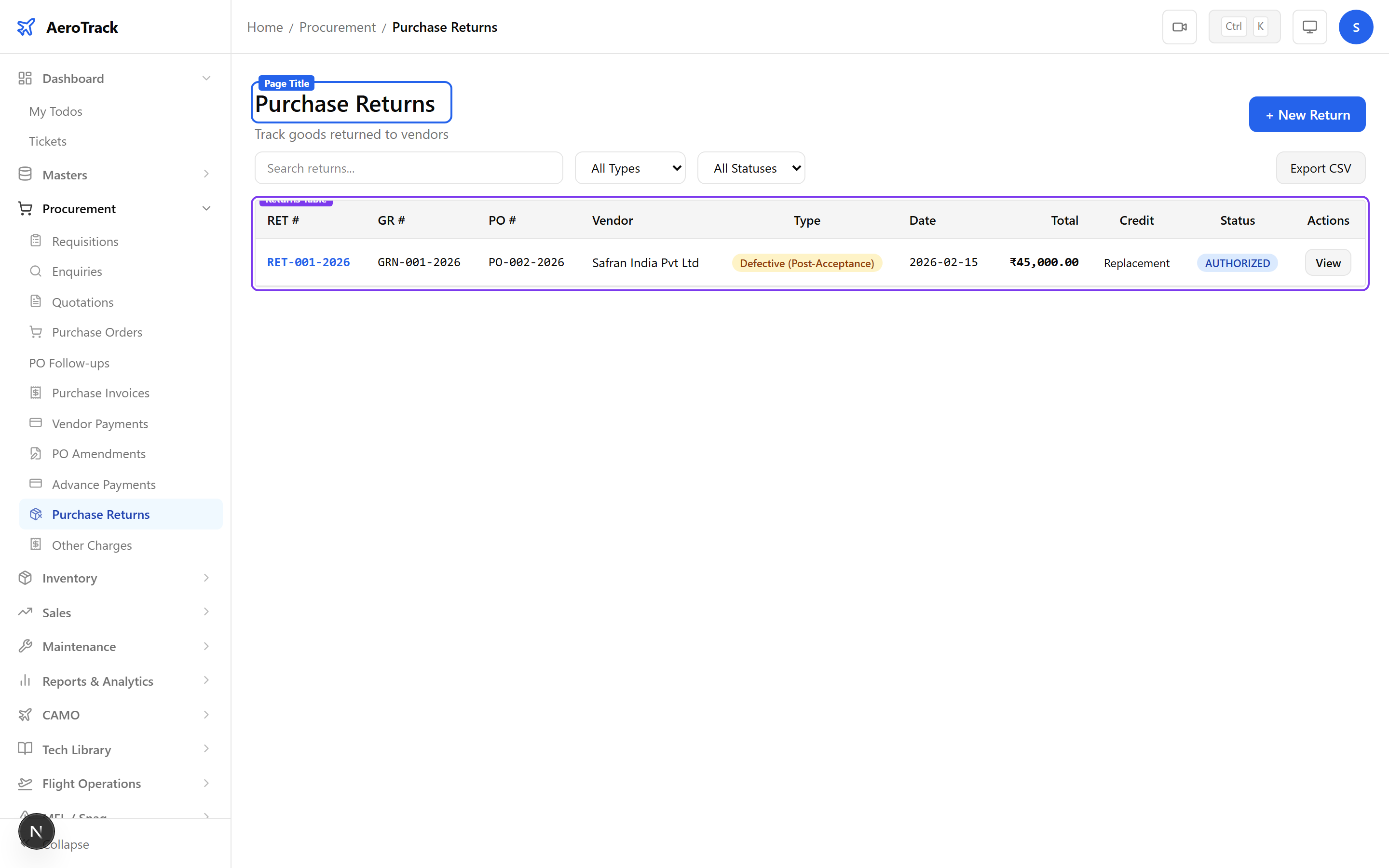
2Filter & Columns
| Column | Description |
|---|---|
| Return # | Auto-generated return reference. |
| GR # | Linked goods receipt number. |
| Vendor | Supplier name (from GR). |
| Type | Defective, Wrong Item, Surplus, Damaged, or Other. |
| Credit | Credit Note, Replacement, or Refund. |
| Status | Draft, Authorized, Dispatched, or Completed. |
| Total | Value of items being returned. |
Create a Return
3Select Goods Receipt
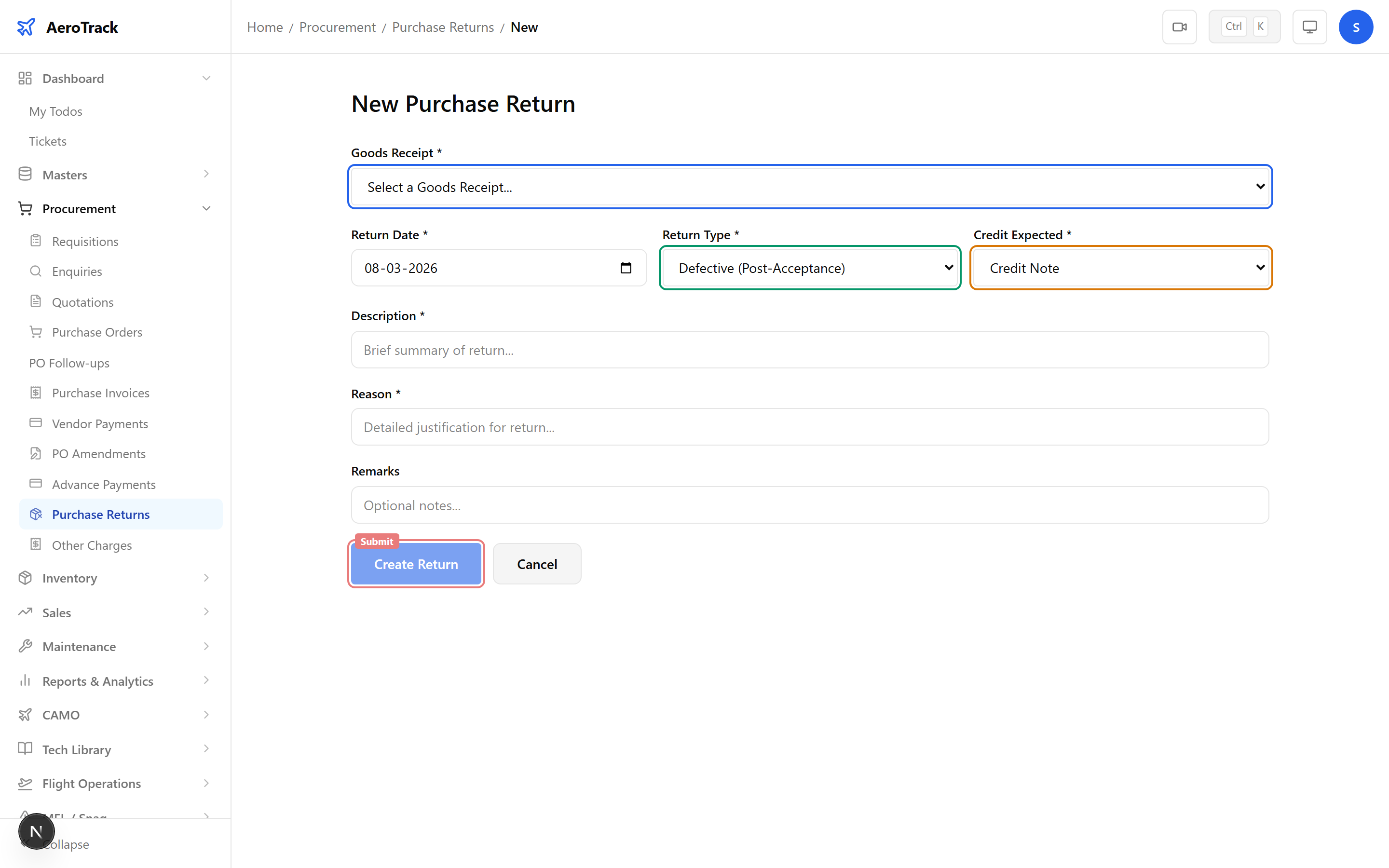
Click + New Return at /procurement/returns/new. Select a goods receipt to load received items.
| Field | Required | Description |
|---|---|---|
| Goods Receipt | Yes | Select from completed GRs. Items and vendor load automatically. |
| Return Date | Yes | Date of the return (defaults to today). |
| Return Type | Yes | Defective, Wrong Item, Surplus, Damaged, or Other. |
| Credit Expected | Yes | Credit Note, Replacement, or Refund. |
| Description | No | Detailed description of why items are being returned. |
| Reason | No | Short reason code or summary. |
4Return Details
The GR info card shows the original receipt details: vendor, PO reference, receipt date, and total items received. This helps you verify you’re returning against the correct receipt.
5Select Return Items
The items table shows all parts from the goods receipt. Enter the return quantity for each item being returned.
| Column | Editable | Description |
|---|---|---|
| Part | No | Part number and name from GR. |
| Received Qty | No | Quantity originally received (reference). |
| Return Qty | Yes | Number of units to return (max = received qty). |
| Unit Price | No | Price from PO (for return value calculation). |
| Return Value | No | Return Qty × Unit Price (auto-calculated). |
Return quantity cannot exceed the received quantity for any item. Items with zero return quantity are excluded from the return.
Workflow
6Return Types
| Type | Description |
|---|---|
| Defective | Items received but found defective during inspection. |
| Wrong Item | Vendor shipped incorrect parts. |
| Surplus | More items received than ordered. |
| Damaged | Items damaged during shipping or handling. |
| Other | Any other reason — describe in the Description field. |
| Credit Option | Description |
|---|---|
| Credit Note | Vendor issues a credit note to offset future invoices. |
| Replacement | Vendor ships replacement items at no additional cost. |
| Refund | Vendor refunds the payment for returned items. |
7Status Flow
| Status | Meaning | Next |
|---|---|---|
| Draft | Return created, pending authorization. | Authorize → Authorized |
| Authorized | Return approved, ready for dispatch. | Dispatch → Dispatched |
| Dispatched | Items shipped back to vendor. | Complete → Completed |
| Completed | Return process finished, credit/replacement received. | — |
Only Draft returns can be edited or deleted. The return total is calculated from the items and displayed as a summary before submission.
8Cross-Links
| Action | Guide |
|---|---|
| View the goods receipt | Goods Receipts |
| View the purchase order | Purchase Orders |
| Track delivery follow-ups | PO Follow-ups |
| Record vendor invoice | Purchase Invoice |